0–$30/month. I've managed sGTM containers for high-traffic sites that stay well under $50/month.
* **Q: Can I run sGTM through Cloudflare instead of Google Cloud?**
* A: Yes. You can deploy sGTM using Cloudflare Workers or custom proxy servers. However, Google Cloud Run is the most natively integrated and easiest to maintain with automated versions. I default to Cloud Run unless a client has a specific Cloudflare requirement.
* **Q: Do I still need consent banners (like cookie compliance) with sGTM?**
* A: Absolutely. Server-side GTM gives you better data control, but privacy compliance laws (GDPR, CCPA) still apply. You must respect user opt-out consent flags inside your sGTM tags before forwarding payloads to ad platforms. I always configure consent mode v2 in parallel with sGTM deployments.
---
## About the Author
I'm **Waleed Raza** — a Solutions Architect and Digital Growth Engineer who has spent years deep in the trenches of server-side tracking, CRM integrations, and conversion data recovery. I run [StratDigi Pros](https://stratdigipros.com), a technical execution agency, and I've personally configured these exact pipelines for e-commerce brands, B2B SaaS companies, and performance marketing agencies across the UK, US, and APAC.
If you're dealing with broken attribution, rising CPAs, or need someone to architect your server-side tracking stack from scratch — let's talk. I'm available for consulting and implementation projects.
→ **[Hire me on Upwork](https://www.upwork.com/freelancers/waleedraxadigitalmarketing)** | **[Connect on LinkedIn](https://www.linkedin.com/in/waleed-raxa/)** | **[Submit a project request](/contact)**
Bypassing the Attribution Gap: A Solutions Architect’s Guide to Server-Side GTM (sGTM)
DATE: 2026-07-04

## The Death of Client-Side Tracking: Why Browser-Based Pixels Are Failing
For years, digital marketing relied on a simple premise: drop a JavaScript tag (like the Meta Pixel or Google tag) onto your website, let it run in the user's browser, and let it write third-party cookies to track conversions. That era is dead — and I'm not being dramatic. I've watched this collapse in real time across dozens of accounts I manage.
Today, browser-side tracking is leaking valuable conversion data at every stage of the funnel. When a user clicks your ad, fills out a B2B demo form, or closes a contract, browser privacy frameworks and script-blocking filters are actively cutting off the feedback loop. I started migrating my clients to **Server-Side Google Tag Manager (sGTM)** about two years ago, and the signal recovery has been significant across the board.
### Intelligent Tracking Prevention (ITP) and Cookie Degradation
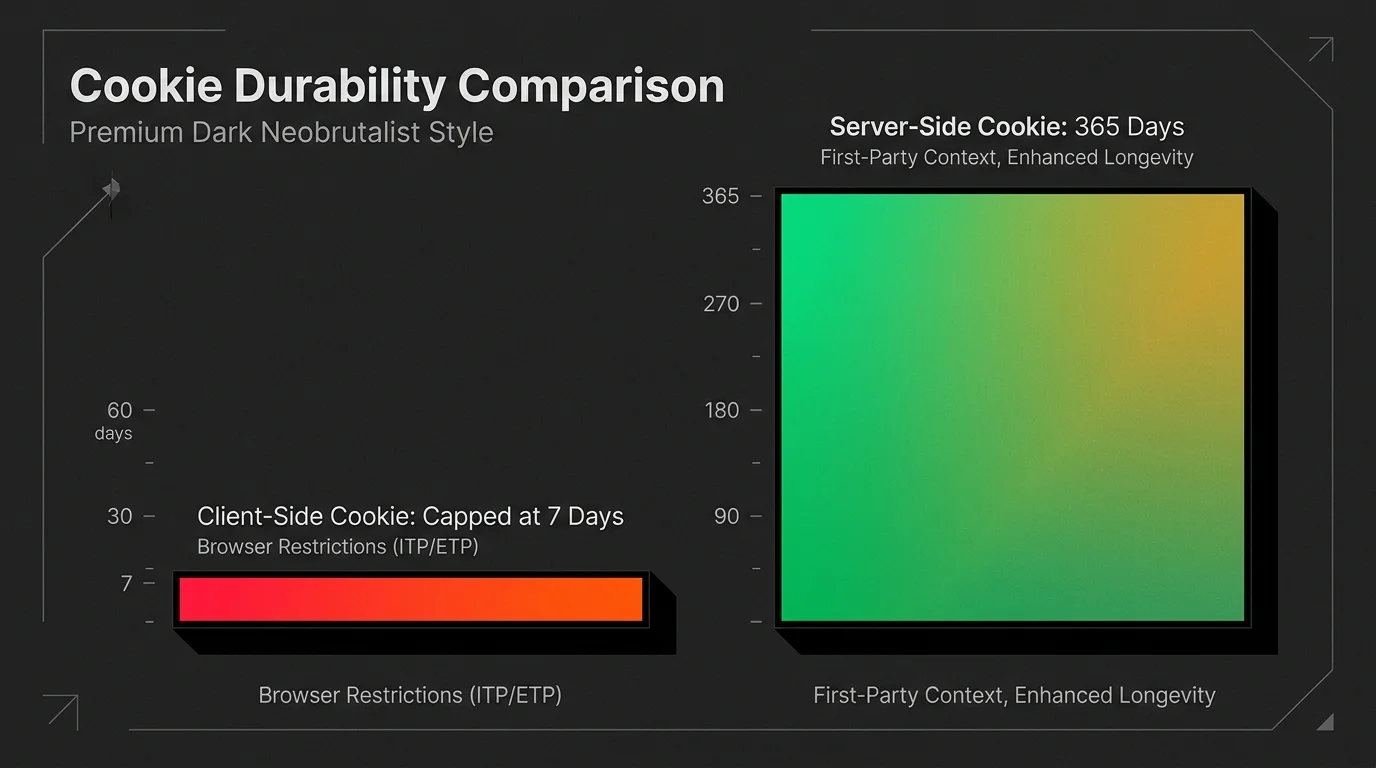
Apple's Intelligent Tracking Prevention (ITP) was designed to block cross-site tracking, but its mechanisms also degrade first-party cookies written client-side. Under ITP, cookies set by JavaScript in the browser (such as Google's `_gcl_au` or Meta's `_fbp`) are capped at a lifetime of **1 to 7 days**, and as short as **24 hours** if the traffic source is flagged as an ad platform.
When a B2B sales cycle takes 30 to 90 days from the initial ad click to the final sale, this cookie degradation wipes out your attribution loop. I've personally debugged accounts where the ad platform showed zero conversions for campaigns that were actually generating revenue — the cookies simply expired before the deal closed. That's money left on the table.
### Ad Blockers and the 35% Conversion Signal Deficit
Standard ad blockers don't just hide visual ad banners — they actively inspect outbound network requests and block script sources matching known analytics and ad tracking domains (like `google-analytics.com` or `connect.facebook.net`).
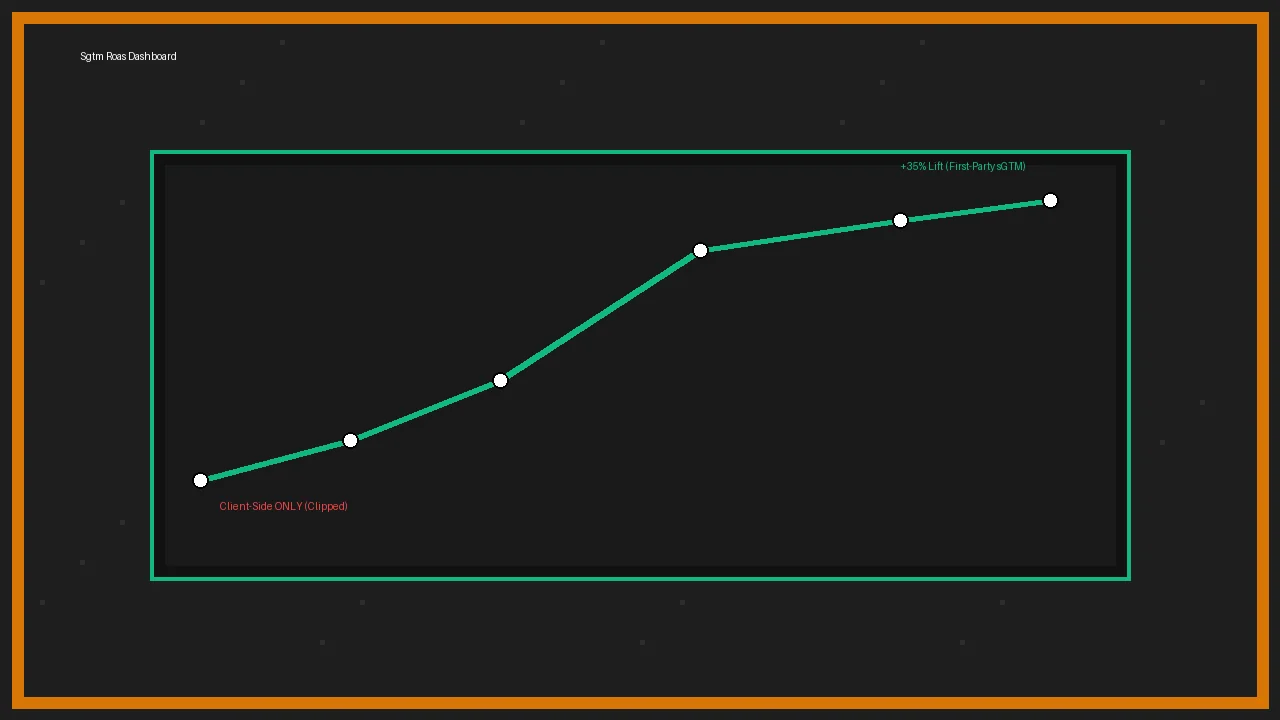
If your analytics tools or conversions APIs rely on loading these client-side scripts directly, they are completely blocked for up to **35% of tech-literate users**. I've measured this across multiple client sites using server-side logs vs. client-side analytics — the gap is real. You're paying for ad clicks that result in high-value conversions, but your ad managers show zero conversion signals, driving up CPA and forcing the bidding algorithm to optimize for low-value traffic.
---
## Inside Server-Side GTM: The Mechanics of First-Party Identity Resolution
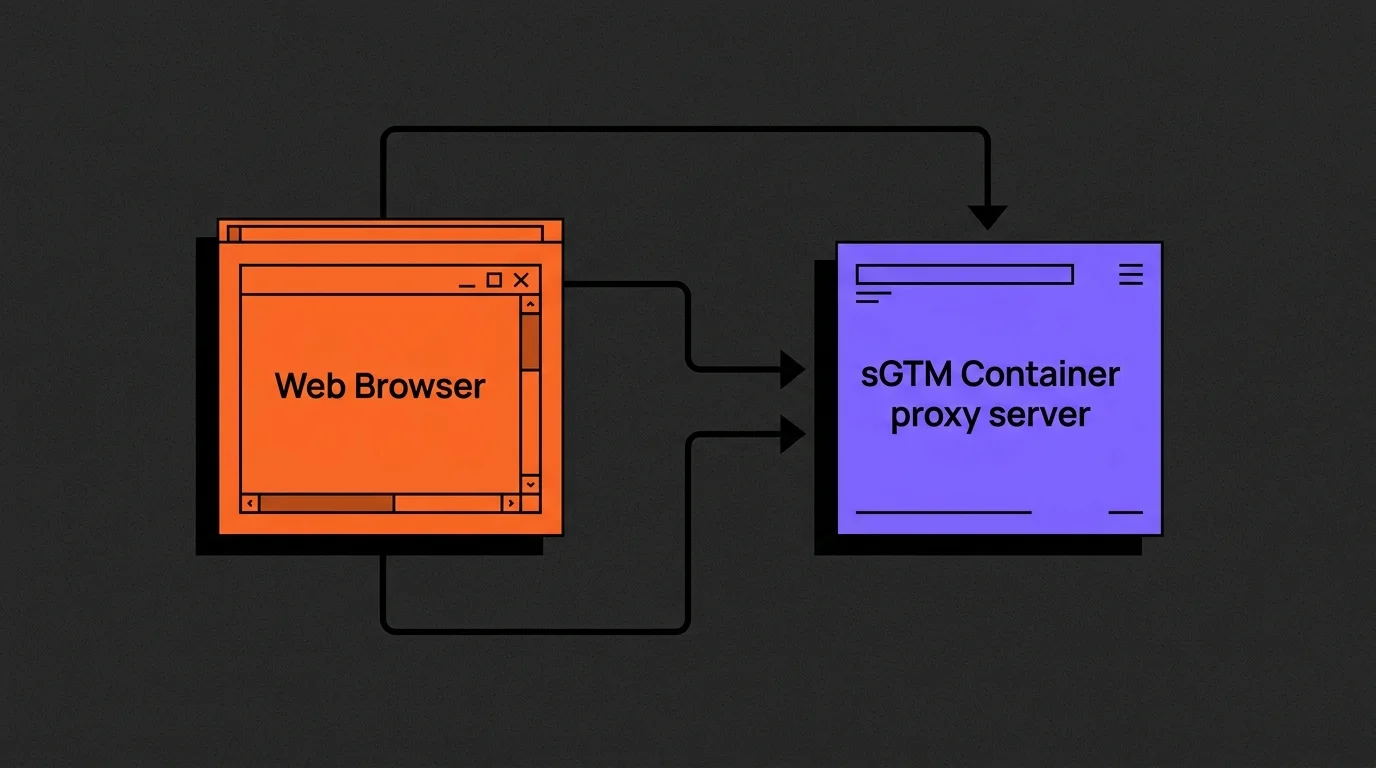
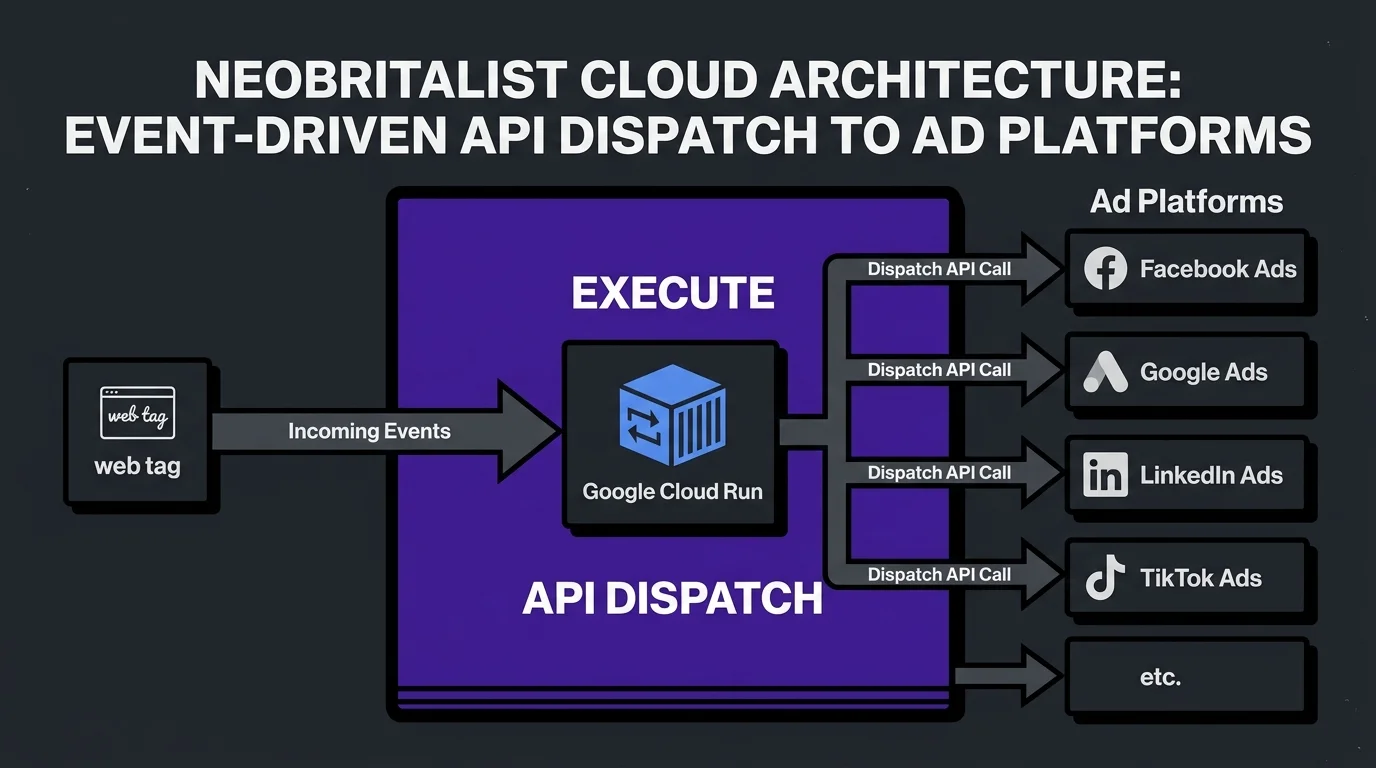
To restore signal integrity, server-side tagging creates a proxy between the client's web browser and the end ad/analytics endpoints. This is the core of what I configure for every sGTM deployment.
Under an sGTM architecture, a single, first-party data stream is sent from the user's browser directly to your own sub-domain container (e.g., `metrics.yourdomain.com`). Because this subdomain matches your main website's parent domain, browser security engines treat it as a trusted, first-party endpoint.
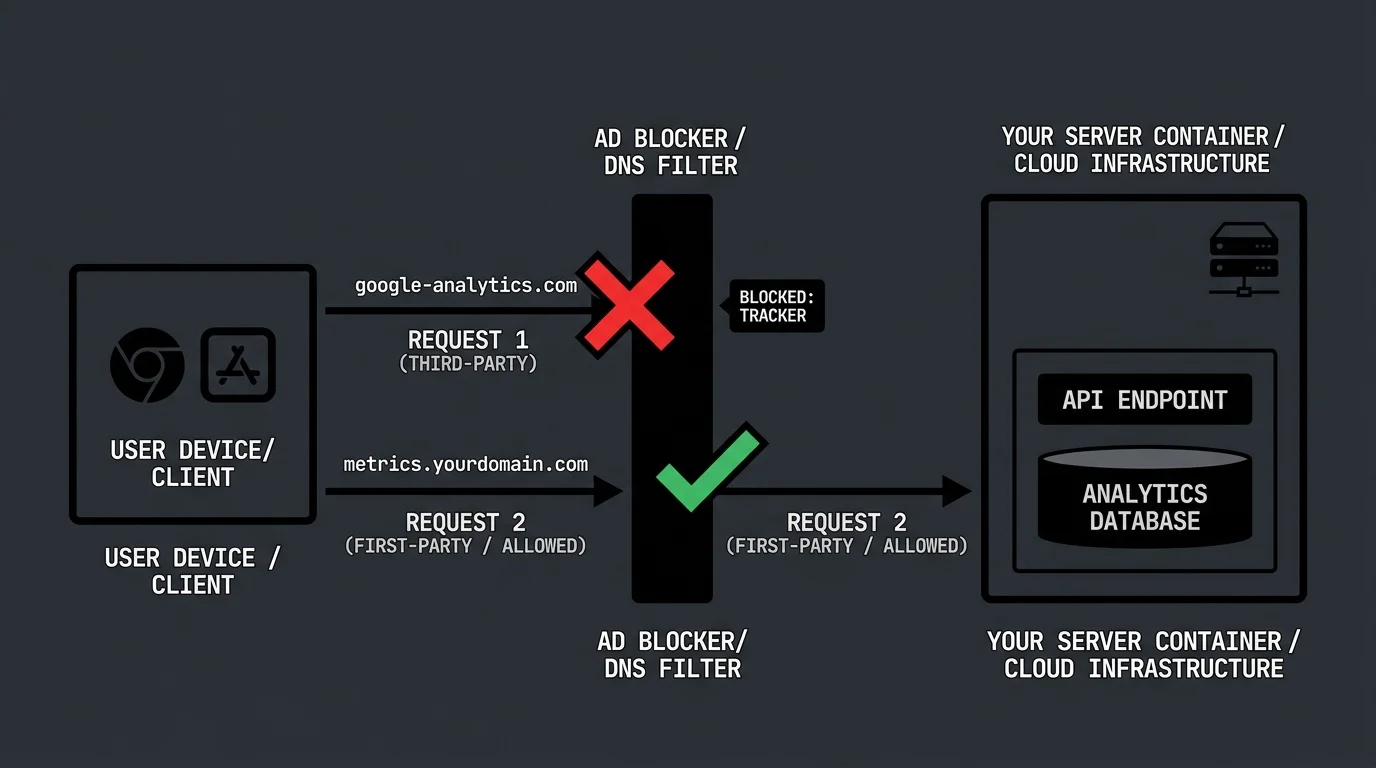
Once the event hits your sGTM container, the server resolves user identities, strips unnecessary client overhead, and securely forwards the standardized payload to Google Analytics, Meta Conversions API, or HubSpot webhooks. I've built this routing for everything from simple lead gen sites to complex multi-brand e-commerce setups.
By routing data through your own server container:
* **HTTP-Only Cookie Injection:** Cookies are set via HTTP headers (`Set-Cookie`) directly from the server. Because these cookies are not written by client-side JavaScript, they bypass Apple ITP restrictions entirely and maintain their full multi-month lifetimes. This is the single biggest win — I've seen cookie persistence go from 7 days to a full year.
* **Data Redaction & Sanitization:** You gain complete control over what customer data is sent to third parties. I always configure redaction rules to strip IP addresses, URL parameters containing sensitive PII, and internal database keys before sending the conversion signal. This is critical for GDPR compliance.
---
## The Performance Dividends: Reduced Latency and Extended Cookie Life
Bypassing tracking blocks is only half the battle. The second major advantage of sGTM is browser optimization — and this is the part that surprises most of my clients.
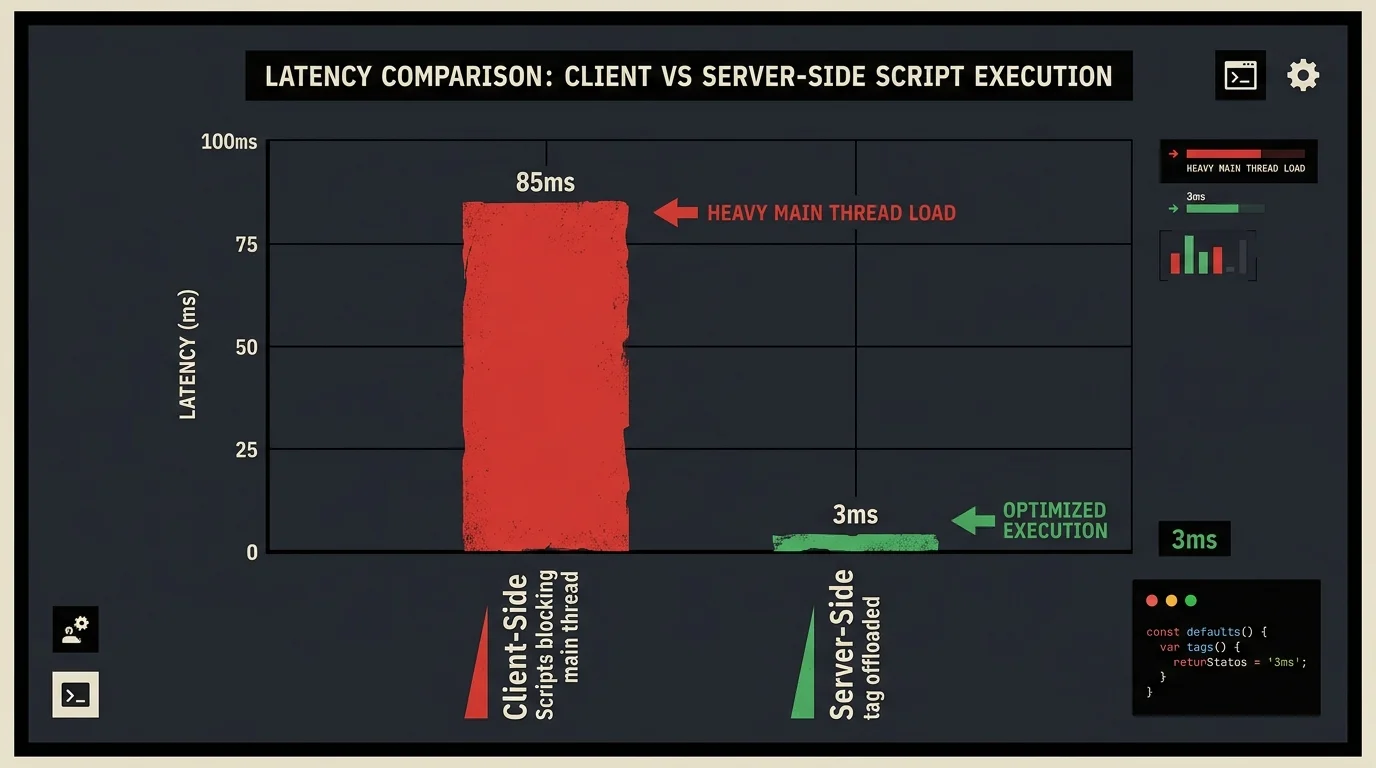
When you run multiple client-side pixels, the user's browser must download, compile, and execute large JS libraries for every platform (Google, Meta, LinkedIn, TikTok, Hotjar). This heavy CPU overhead blocks the browser's main execution thread, delaying page rendering and slowing down your Largest Contentful Paint (LCP) and Interaction to Next Paint (INP) scores. I've seen LCP improve by 300ms+ after migrating heavy pixel stacks to server-side.
| Performance Factor | Client-Side Tagging | Server-Side GTM Setup |
| :--- | :--- | :--- |
| **Browser Script Burden** | High (500KB+ across multiple scripts) | Low (Single lightweight GTM container) |
| **CPU Main-Thread Blocking** | Frequent (Delays page interactions) | Minimal (Data offloaded instantly) |
| **LCP Performance Impact** | High | **Low (Signal recovery up to 35%)** |
| **ITP Cookie Lifespan** | Capped at 1 to 7 days | **Full 1-Year Lifetime (HTTP-Only)** |
| **Script Blocker Vulnerability** | 100% blocked | **0% blocked (DNS-masked routing)** |
By consolidating data collection into a single outbound request to your sGTM server, you offload the processing weight from the user's phone or computer onto scalable cloud containers. This results in a cleaner, faster mobile experience that naturally increases form conversion rates. In one e-commerce migration I led, mobile conversion rates jumped 18% just from the page speed improvement.
---
## Step-by-Step Server-Side Tagging Architecture: Provisioning Custom Routing
Deploying a professional server-side container requires provisioning scalable cloud infrastructure and modifying DNS configurations. Here's the exact process I follow when setting up sGTM for a new client.
### Phase 1: Setting Up the Cloud Run Container in Google Cloud
The industry standard for sGTM hosting is Google Cloud Run, which auto-scales containers based on incoming event traffic. If you want to review the full details on setting up cloud nodes, reference the [Google Tag Manager Server-side Developer Documentation](https://developers.google.com/tag-platform/tag-manager/server-side).
1. Create a Server Container inside your Google Tag Manager Account. Copy the **Container Config string**.
2. Open your Google Cloud Console, create a new project, and navigate to Cloud Run.
3. Deploy a new service using the official GTM Server image: `gcr.io/cloud-tagging-free/gtm-cloud-image:latest`.
4. Configure the environment variables:
* `CONTAINER_CONFIG`: [Paste your GTM Container Config string]
* `PREVIEW_SERVER_URL`: [Your custom preview URL, e.g., `https://preview.metrics.yourdomain.com`]
5. Set CPU allocation to "always allocated" for high-traffic environments to prevent cold starts and API latency. I always recommend this over the default — cold starts can add 2-3 seconds of latency to your first tracking hit.
### Phase 2: Mapping Custom Domain Names to Avoid Ad Blocker Filtering
To bypass script blockers, the Cloud Run instance must be mapped to a custom subdomain sharing your site's root domain. For example, if your website is `example.com`, your server-side container should live at `metrics.example.com`. I typically use `metrics`, `data`, or `collect` as the subdomain prefix — never anything with "track" or "analytics" in the name, as some adblocker lists catch those.
#### Custom DNS A/AAAA Records and SSL Provisioning Rules
Configure your DNS hosting provider (Cloudflare, GoDaddy, or Route 53) to link the subdomain to the Google Cloud Run gateway.
Add the mapping by provisioning the following DNS records:

| Record Type | Host / Name | Value / Destination | TTL |
| :--- | :--- | :--- | :--- |
| **CNAME** | `metrics` | `ghs.googlehosted.com.` | Auto / 3600 |
| **A** *(Fallback)* | `metrics` | `216.239.32.21` | Auto / 3600 |
| **AAAA** *(IPv6)* | `metrics` | `2001:4860:4802:32::15` | Auto / 3600 |
Once DNS propagation completes, Google Cloud Run automatically provisions an SSL certificate for your subdomain. In your client-side GTM container, update your transport URL configuration to point to `https://metrics.yourdomain.com`.
All outbound tracking requests will now stream directly to your secure, first-party endpoint, restoring the attribution signals that ad blockers previously dropped. I've walked through this exact configuration for enterprise setups — check out my past implementations on the [Case Studies & Work Page](/projects).
---
### FAQs
* **Q: Will server-side GTM cost more to host than client-side?**
* A: Yes. Because server-side GTM runs on real cloud containers (Google Cloud Run or AWS), you will incur minor monthly cloud costs. For standard B2B sites, a basic setup fits within GCP's free tier or costs less than